Build Your Own SEO Rank Tracker With a SERP API
Off-the-shelf rank trackers are a black box you rent by the keyword. Wire a SERP API to a database yourself and you own the geo depth, the AI-Overview capture, and the alerting — for a fraction of the price.
Commercial rank trackers charge by the keyword and hand you a dashboard you cannot query. Build your own on a SERP API and you flip that: you own the raw SERP snapshots, choose exactly which geos and devices to track, capture the parts of the results page that now decide visibility — AI Overviews, People Also Ask, the local pack — and wire alerts to whatever you already use. This is a complete tutorial: the schema, the daily run, the AI-Overview and PAA capture, the diffing and alerting, and the 2026 gotchas that break naive trackers. It runs on the QuantumProxies SERP API, so there is no proxy pool to manage.
The gotcha that reshaped rank tracking
Two changes make a modern tracker look different from a 2020 one. First, Google removed the &num=100 parameter, so you can no longer pull 100 results in a single request — you paginate roughly ten at a time, which changes how deep you can afford to track and makes an efficient API mandatory rather than optional. Second, the results page is no longer a clean list of ten blue links: an AI Overview can sit above everything and answer the query outright, People Also Ask boxes and featured snippets absorb clicks, and the local pack owns commercial intent. Tracking a plain position number while ignoring those is tracking the wrong thing. Our explainer on how SERP scraping works in 2026 covers the num=100 fallout in depth.
Step 1: a schema built for diffing
The whole system is a daily snapshot you diff against yesterday, so the schema is snapshot-first: one row per keyword, geo, device and day, with the ranking data and the SERP features stored alongside. Keep the AI Overview and PAA as structured columns so you can query them directly.
CREATE TABLE serp_snapshot (
  id           bigserial PRIMARY KEY,
  keyword      text        NOT NULL,
  country      text        NOT NULL,   -- gl: us, gb, de...
  city         text,                   -- optional city-level
  device       text        NOT NULL,   -- desktop | mobile
  position     int,                    -- your domain's best rank, null = not found
  landing_url  text,
  aio_present  boolean     NOT NULL,   -- AI Overview shown?
  aio_cited    boolean     NOT NULL,   -- did it cite your domain?
  paa          jsonb,                  -- People Also Ask questions
  top3         jsonb,                  -- who owns positions 1-3
  captured_at  date        NOT NULL,
  UNIQUE (keyword, country, city, device, captured_at)
);
Step 2: the daily geo run
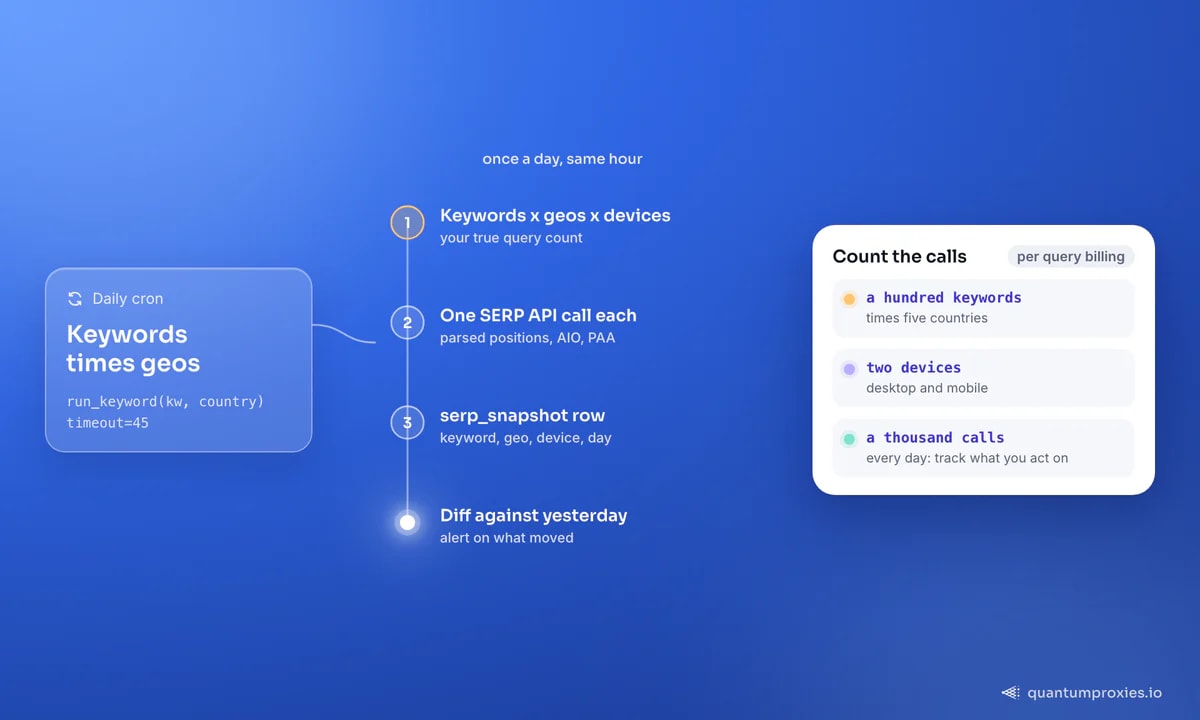
The core loop iterates your keywords across each target geo and device, calls the SERP API once per combination, and finds your domain's best position. Because the API returns parsed JSON and handles rotation, geo and blocking internally, this stays a simple loop — no headless browser, no proxy rotation code, no CAPTCHA handling. Set gl for the country and a location for city-level, and the results come back already localised.
import requests, datetime

QP = "https://api.quantumproxies.io/v1/scraper/serp"
HEAD = {"Authorization": f"Bearer {QP_KEY}"}

def run_keyword(keyword, country, device="desktop", city=None):
    params = {"engine": "google", "query": keyword,
              "gl": country, "device": device, "num": 20}
    if city:
        params["location"] = city
    data = requests.post(QP, headers=HEAD, json=params, timeout=120).json()["payload"]

    pos, url = None, None
    for r in data.get("organic", []):
        if "yourdomain.com" in r["link"]:
            pos, url = r["rank"], r["link"]
            break
    return data, pos, url
Get a SERP API key to power your tracker
Step 3: capture AI Overviews and PAA
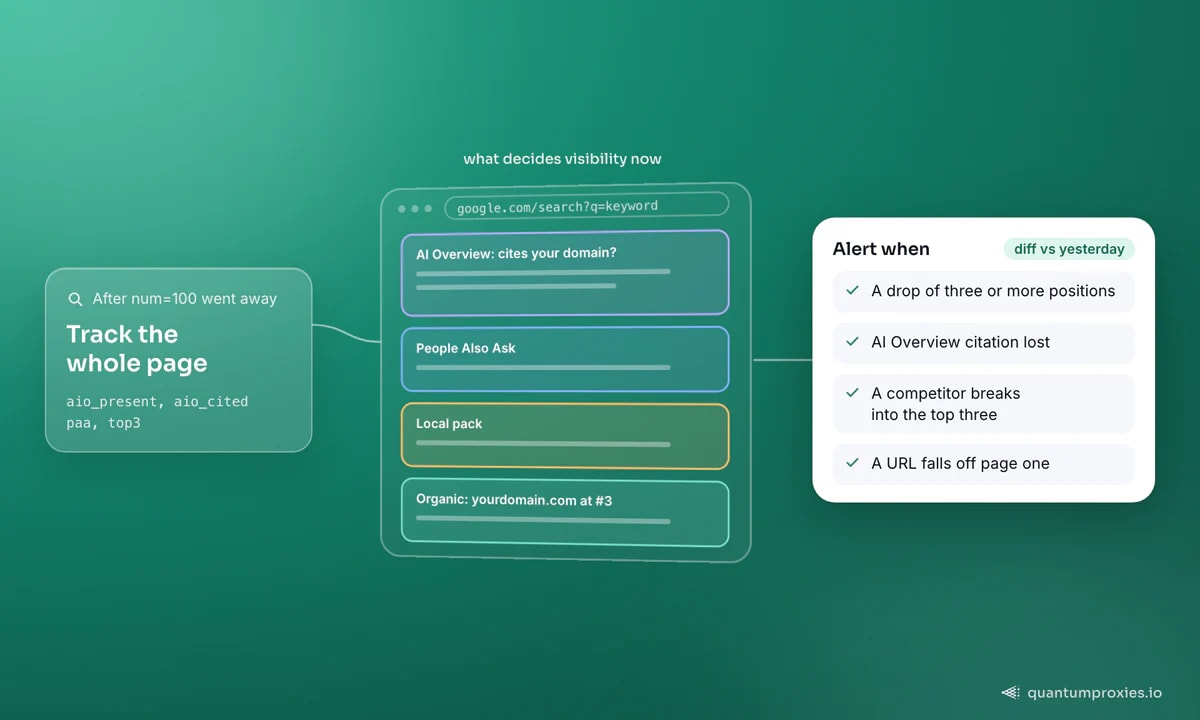
This is where a homegrown tracker beats the cheap commercial ones, most of which still report only the ten links. An AI Overview can push your organic result below the fold even when you "rank" third, and being cited inside the AI Overview is now its own visibility metric worth tracking separately. Pull both the presence of the AIO and whether it references your domain, and store the PAA questions — they double as fresh keyword and content ideas.
def extract_features(data, domain="yourdomain.com"):
    aio_present = bool(data.get("ai_overview"))
    aio_cited = any(domain in (s.get("link") or "")
                    for s in data.get("ai_overview_references", []))
    paa = [q["question"] for q in data.get("people_also_ask", [])]
    top3 = [r["link"] for r in data.get("organic", [])[:3]]
    return aio_present, aio_cited, paa, top3
Tracking AIO citation over time is fast becoming the headline SEO metric — our guide on capturing AI Overview presence programmatically goes deeper on the signals worth logging. Run the same keyword from several countries and you will see rankings and AIO citations diverge by geo, which is exactly why city-level runs matter for anyone with a local or international footprint, as covered in monitoring SERP changes globally.
Step 4: diff and alert
A tracker nobody reads is a log file. The value is in the alert — a message the moment something moves. After each run, compare the new snapshot against the previous day and fire on the changes that matter: a drop of three or more positions, gaining or losing an AI Overview citation, a competitor breaking into the top three, or a URL falling off page one. Push those to Slack, email or a webhook so the SEO team hears about a slide before the traffic report does.
def diff_and_alert(kw, geo, today, yesterday):
    alerts = []
    if yesterday.position and today.position:
        if today.position - yesterday.position >= 3:
            alerts.append(f"{kw} [{geo}] dropped "
                          f"{yesterday.position} -> {today.position}")
    if yesterday.aio_cited and not today.aio_cited:
        alerts.append(f"{kw} [{geo}] lost its AI Overview citation")
    if today.position and today.position > 10 and \
       (yesterday.position or 0) <= 10:
        alerts.append(f"{kw} [{geo}] fell off page one")
    for a in alerts:
        notify(a)   # -> Slack / email / webhook
Scheduling, and staying honest about volume
Run the whole thing on a daily cron, ideally at a consistent hour so day-over-day diffs compare like with like. Be realistic about scale: keywords multiplied by countries multiplied by cities multiplied by devices is your true query count, and it grows fast — a hundred keywords across five countries on two devices is a thousand SERP calls a day. The SERP API bills per query, so track the combinations you will actually act on rather than everything imaginable. If you are building this into a product rather than an internal tool, our post on choosing a SERP API for AI and SEO tools covers the per-query economics. The same endpoints are available through our MCP server if you would rather drive runs from an agent.
Frequently asked questions
How do I build a rank tracker with a SERP API?
Store one snapshot per keyword, geo, device and day; call the SERP API once per combination to get parsed results; extract your domain's position plus AI Overview and PAA data; then diff each day against the previous and alert on meaningful movement. The API handles proxies, geo and blocking, so your code stays a scheduled loop over a database.
Can I still get 100 results per query?
Not in one request — Google removed the num=100 parameter, so results come roughly ten per page and deeper tracking means pagination. For most tracking you only need the top 20 or so, which keeps query volume and cost down. A SERP API that paginates for you hides this detail behind a single call.
How do I track AI Overview presence?
Capture two things per run: whether an AI Overview appeared for the query, and whether it cited your domain among its sources. Store both as separate fields so you can trend citation over time — being referenced inside the AI Overview is now its own visibility metric, distinct from your organic position.
How often should a rank tracker run?
Daily is standard for SEO, at a consistent time so diffs are comparable. Volatile or high-value terms can justify twice-daily runs; stable, low-priority terms are fine weekly. Match the frequency to how fast the keyword actually moves and to your SERP-API query budget, since keywords times geos times devices is your real cost driver.
A rank tracker is a schema, a daily SERP call, and a diff — the leverage is owning all three. Capture position, AI Overviews and PAA across the geos you care about, alert on real movement, and you have a tracker that costs a fraction of the commercial ones and answers questions they never let you ask.