Scrape GitHub Data Past the API Rate Limit: Stars, Dependents
GitHub's API caps unauthenticated calls at 60 an hour and hides dependents and trending entirely. Here is how to mine the signals that matter across cheap IPs.
GitHub is a research goldmine - adoption curves, competitor momentum, dependency graphs, hiring signals - and its official API will hand you a slice of that for free. Then it stops. Unauthenticated calls are capped at 60 an hour, and the two datasets people most want, the dependents graph and the trending page, are not in the API at all. This guide covers how to scrape GitHub data past those ceilings: what the API gives you, what you have to read from HTML, and why GitHub is a rare target where cheap datacenter and IPv6 proxies are the right tool.
Know the limits before you fight them
Start with the API - it is structured, blessed, and cheap on quota if you authenticate. The numbers that shape everything: unauthenticated REST requests are limited to 60 per hour, counted per IP; an authenticated token gets 5,000 per hour; the Search API is tighter still at 30 requests per minute authenticated (10 unauthenticated). The key detail is that the unauthenticated ceiling is counted per IP - which is precisely why routing reads across many IPs multiplies your headroom.
import requests

# Authenticated API call - watch the rate-limit headers
headers = {"Authorization": "Bearer YOUR_GH_TOKEN",
           "Accept": "application/vnd.github+json"}
r = requests.get("https://api.github.com/repos/psf/requests", headers=headers, timeout=15)
repo = r.json()
print(repo["stargazers_count"], repo["forks_count"], repo["open_issues_count"])
print("remaining this hour:", r.headers["X-RateLimit-Remaining"])
Use the API for anything it exposes cleanly, and use git clone for file contents - cloning and processing a repo locally is faster and gentler than scraping individual file pages. Scraping HTML is for the signals the API rate-limits into uselessness or omits entirely.
What you have to read from HTML
Three high-value datasets live only on the rendered pages. The dependents graph - GitHub's "Used by" count and the list of repositories that depend on a package - is one of the strongest adoption metrics there is, and it is not in the API. The trending pages (github.com/trending, filterable by language and window) are HTML-only. And topic pages surface repositories by subject far more usefully than search quota allows. All three are plain server-rendered HTML, so a simple request-and-parse works - no browser required.
import requests
from bs4 import BeautifulSoup

# Scrape the trending page through a datacenter proxy
PROXY = "http://USER-type-datacenter:PASS@datacenterboson.quantumproxies.io:10000"

def trending(language="python", since="daily"):
    url = f"https://github.com/trending/{language}?since={since}"
    r = requests.get(url, proxies={"https": PROXY}, timeout=20,
                     headers={"User-Agent": "Mozilla/5.0"})
    soup = BeautifulSoup(r.text, "html.parser")
    repos = []
    for row in soup.select("article.Box-row"):
        name = row.select_one("h2 a")["href"].strip("/")
        stars = row.select_one("a[href$='/stargazers']")
        repos.append({"repo": name,
                      "stars": stars.get_text(strip=True) if stars else None})
    return repos

print(trending("rust", "weekly")[:5])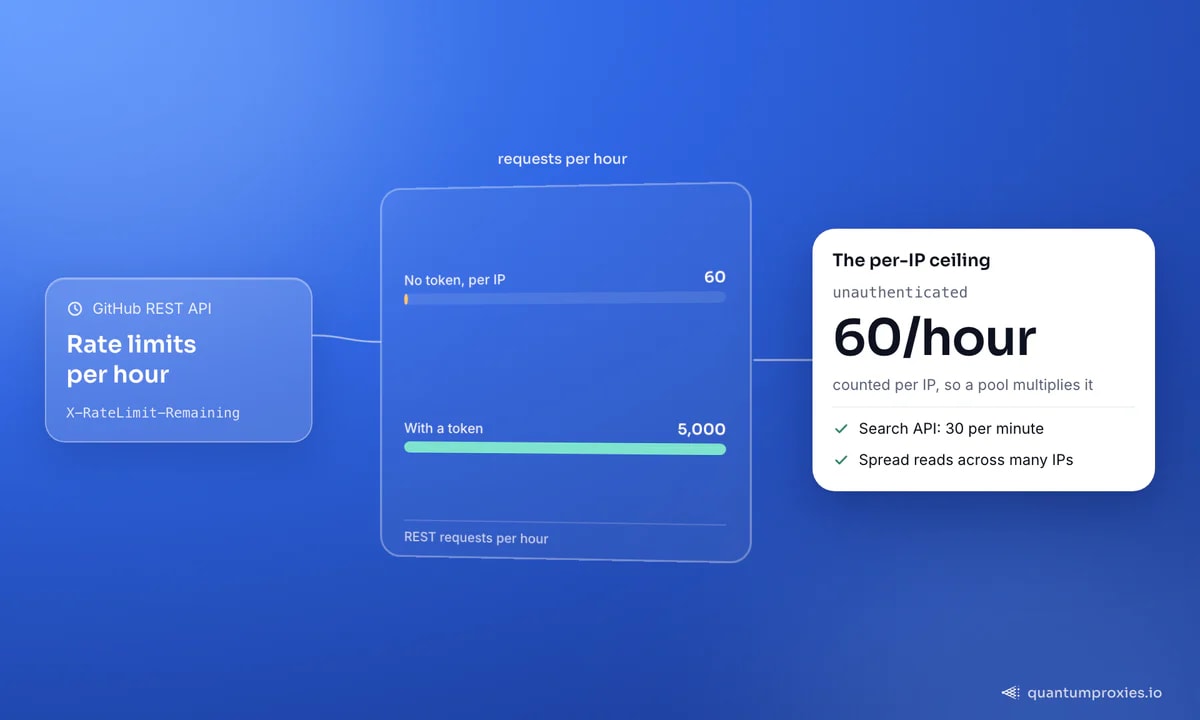
GitHub is a datacenter (and maybe IPv6) target
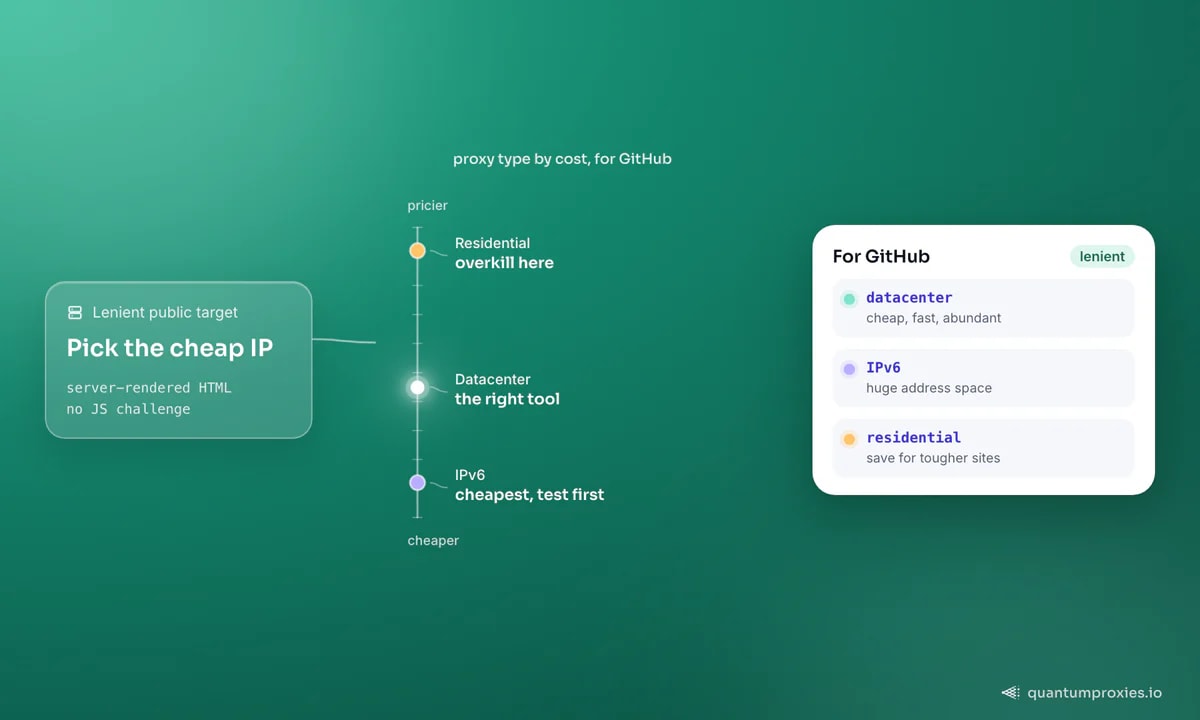
Here is the part people over-engineer. GitHub's public pages are server-rendered, lenient, and carry no aggressive JavaScript challenge - so you do not need premium residential IPs to read them. This is a textbook case for datacenter proxies: cheap, fast, and abundant, spread wide so no single IP approaches the unauthenticated limit or trips a secondary rate limit. Reaching for residential here is paying luxury prices for a job an economy IP does perfectly. Our guide on when datacenter proxies are the right call lays out exactly this kind of lenient, high-throughput target.
There is an even cheaper option worth testing: IPv6. When a target answers over IPv6, IPv6 proxy pools give you an enormous, low-cost address space - ideal for spreading per-IP-limited reads across thousands of exits. GitHub has been rolling out IPv6 support, so it is one of the few large targets where this is worth checking rather than assuming. Test it before you commit: run the target through our free IPv6 compatibility checker, and read the economics in our complete IPv6 proxies guide.
Get fast datacenter proxies for GitHub
Mind the secondary rate limit
The per-hour ceilings are not the only limiter you will meet. GitHub also runs abuse-detection that reacts to bursty, highly concurrent, or suspiciously regular traffic - so even while you sit comfortably under the numeric limit, hammering from a single IP can earn a temporary block. The defences are the same ones that make you a polite client: cap concurrency, add a little jitter between requests, honour any Retry-After header the server hands you, and spread the load so no single exit ever carries a runaway pattern. This is the real reason a wide pool matters - it is not just the 60-per-hour arithmetic, it is that no individual IP should ever look like a script gone rogue. Back off at the first 403 or slowdown rather than retrying straight into a longer ban.
Turning repo data into dev-tool intel
The point of all this is the analysis layer. Track a competitor library's star velocity and dependents count over time and you are watching adoption in real time. Diff the trending pages by language week over week to spot rising tools before they are obvious. Pull contributor lists to read team size and hiring signals. Combine language breakdowns across a topic to map a whole ecosystem. Snapshot repositories on a schedule, store each capture with a timestamp, and the deltas become the product - momentum, not a single number. A one-off reading of 40,000 stars is trivia; the same repository adding 2,000 stars a week while its dependents count climbs is a genuine adoption signal you can act on before the wider market notices.
import requests
from bs4 import BeautifulSoup

# The 'Used by' dependents count - a top adoption signal, HTML-only
def used_by(owner, repo):
    url = f"https://github.com/{owner}/{repo}/network/dependents"
    proxy = "http://USER-type-datacenter:PASS@datacenterboson.quantumproxies.io:10000"
    r = requests.get(url, proxies={"https": proxy}, timeout=20,
                     headers={"User-Agent": "Mozilla/5.0"})
    soup = BeautifulSoup(r.text, "html.parser")
    tab = soup.select_one("a.btn-link.selected")
    return tab.get_text(strip=True) if tab else None

print(used_by("pallets", "flask"))   # e.g. '1.4m Repositories'
One habit keeps costs sane at volume: request only what you need. Repo pages are lightweight, but if you fan out to thousands of repositories, block assets and reuse connections - our notes on cutting proxy bandwidth apply even to a cheap target, because the win compounds.
Frequently asked questions
What is GitHub's API rate limit?
Unauthenticated REST requests are limited to 60 per hour, counted per IP address. An authenticated token raises that to 5,000 per hour. The Search API is separate and tighter - 30 requests per minute authenticated, 10 unauthenticated. Because the unauthenticated limit is per IP, spreading reads across a proxy pool is an effective way to scale collection.
Can I scrape GitHub data the API doesn't expose?
Yes. The dependents graph ("Used by"), the trending pages, topic listings and stargazer timelines are HTML-only or heavily quota-limited via the API. They are plain server-rendered pages, so a request-and-parse with BeautifulSoup works without a browser. Route through datacenter proxies and spread the reads to stay under secondary rate limits.
Do I need residential proxies for GitHub?
Usually not. GitHub's public pages are lenient and server-rendered with no aggressive JavaScript challenge, so cheap datacenter proxies handle them well - the goal is spreading requests across IPs, not disguising them as households. If the target answers over IPv6, IPv6 pools are cheaper still. Reserve residential IPs for genuinely hostile targets.
Should I use git clone or scrape file pages?
Clone for file contents. Running git clone and processing the repository locally is faster, gentler on GitHub, and avoids per-file rate limits entirely. Reserve HTML scraping and the API for metadata and signals - stars, dependents, trending, contributors - that you cannot get from the checked-out files themselves.
GitHub rewards a layered approach: API where it is generous, git clone for files, and HTML scraping for the adoption signals it hides - all spread across cheap IPs so no single address hits the 60-per-hour wall. Test for IPv6, lean on datacenter pools, and the whole platform becomes a live dev-ecosystem dataset.