How to Scrape Amazon Product Data at Scale in Python
The three-line BeautifulSoup tutorial works once, then Amazon serves you a CAPTCHA. Here's what actually breaks at scale — shifting price selectors, geo pricing, IP blocks — and the pipeline that survives it.
Scraping Amazon product data looks trivial in every beginner tutorial: requests, BeautifulSoup, grab the title and price, done. That works exactly until you run it a few hundred times, at which point Amazon hands you a robot-check page and your price selector returns None. This guide is about the version that survives contact with the real site — an ASIN-first pipeline, the selectors that actually break, why the same product shows a different price to different IPs, and the proxy setup that keeps you off the CAPTCHA wall. It's about public product data (titles, prices, ratings, availability), not anything behind a login.
The URL structure: ASINs are the key
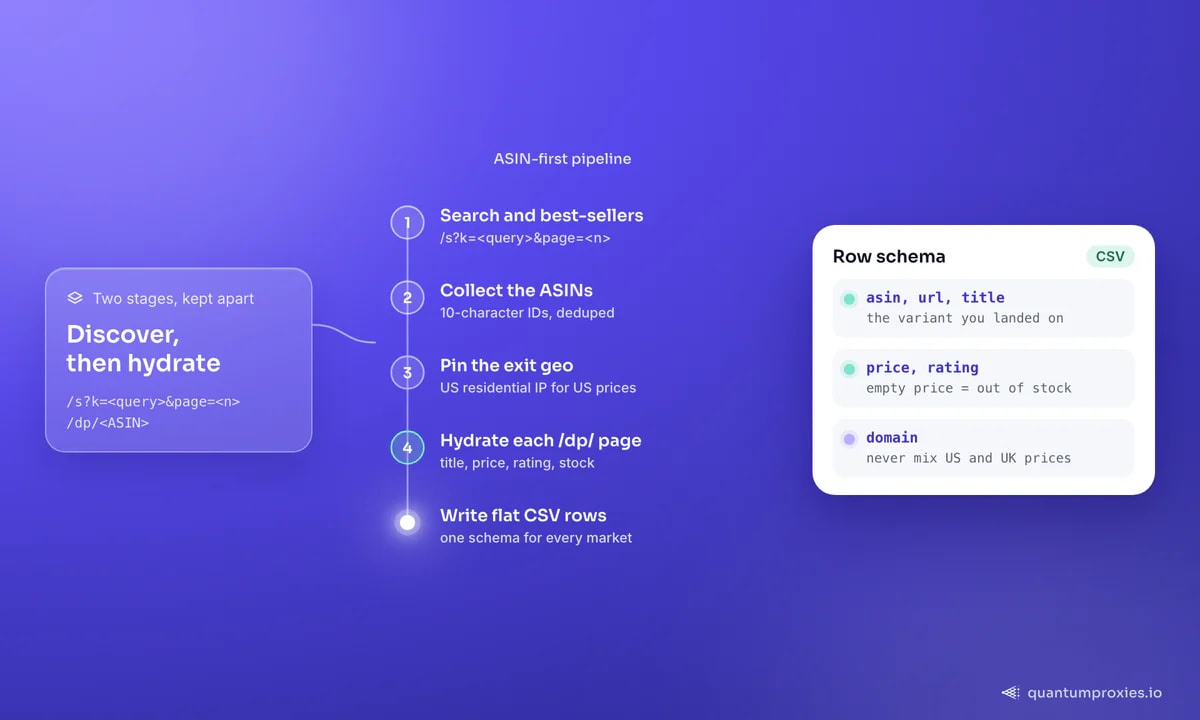
Every Amazon product has an ASIN — a 10-character identifier like B08N5WRWNW — and the whole catalogue hangs off it. A product page is just https://www.amazon.com/dp/<ASIN>, and the same ASIN maps across marketplaces (amazon.co.uk/dp/<ASIN>, amazon.de/dp/<ASIN>). Search and category pages live under /s? with query and browse-node parameters. So a scalable pipeline has two stages: discover ASINs from search or best-seller pages, then hydrate each one from its /dp/ page. One caveat — a "parent" ASIN (a product with size or colour variants) resolves to an auto-selected child variation, so capture the variant ASIN you actually landed on.
import requests
from bs4 import BeautifulSoup

PROXY = "http://USER:PASS@residentialpremium.quantumproxies.io:8080"
HEADERS = {"User-Agent": "Mozilla/5.0 (Windows NT 10.0; Win64; x64) "
           "AppleWebKit/537.36 (KHTML, like Gecko) Chrome/132.0.0.0 Safari/537.36",
           "Accept-Language": "en-US,en;q=0.9"}

def product(asin, domain="com"):
    url = f"https://www.amazon.{domain}/dp/{asin}"
    r = requests.get(url, headers=HEADERS,
                     proxies={"http": PROXY, "https": PROXY}, timeout=20)
    soup = BeautifulSoup(r.text, "html.parser")
    return parse(soup, asin)
The selector that everyone copies and Amazon retired
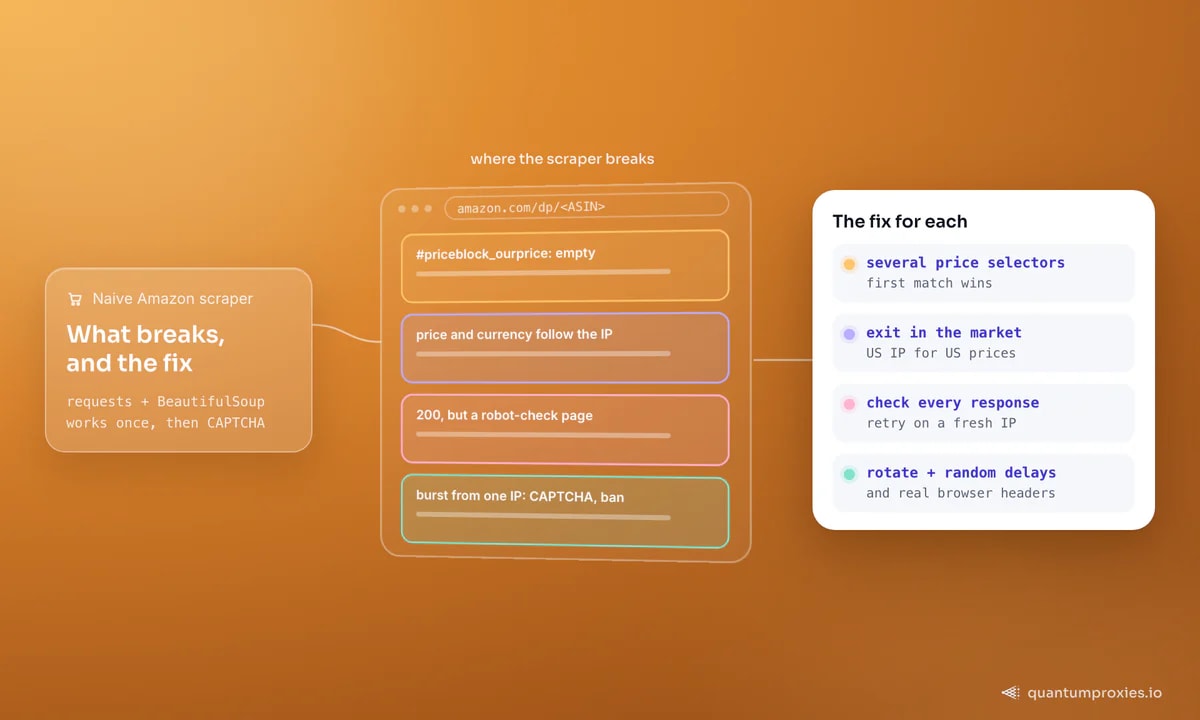
Nearly every old tutorial reads the price from span#priceblock_ourprice. Amazon serves multiple price-block layouts and A/B-tests them, so that single ID is empty on most pages today. The durable approach is to try several known price containers in order and take the first that matches — and to treat a missing price as a real state (usually out of stock), not a crash.
def parse(soup, asin):
    title = soup.select_one("#productTitle")
    price = None
    for sel in ["span.a-price span.a-offscreen",   # current layout
                "#priceblock_ourprice",             # legacy
                "#priceblock_dealprice",            # deal layout
                "#corePrice_feature_div .a-offscreen"]:
        el = soup.select_one(sel)
        if el and el.get_text(strip=True):
            price = el.get_text(strip=True)
            break
    rating = soup.select_one("span.a-icon-alt")
    return {
        "asin": asin,
        "title": title.get_text(strip=True) if title else None,
        "price": price,                 # None -> likely out of stock
        "rating": rating.get_text(strip=True) if rating else None,
    }
Why the same product shows two prices
This is the fact that quietly ruins pricing datasets. Amazon localises price and availability to the shopper's delivery location — the "Deliver to" setting — which it infers largely from your IP. Scrape amazon.com from a German datacenter IP and you may get euro pricing, different offers, or a different Buy Box winner than a US shopper sees. If you're collecting competitive pricing data, the exit-IP geography is the experiment: to capture the price a US buyer sees, you route through a US residential proxy; for the UK market, a UK exit. One product, many prices, one per market you sample.
Get geo-targeted residential proxies
Why naive scrapers get blocked
Amazon runs automated request-management systems: burst too fast from one IP and you get a CAPTCHA, an IP ban, or a stripped-down page. Three things keep a scraper alive at volume. First, rotate IPs so no single address carries the whole load — a rotating residential pool spreads requests across many real consumer IPs. Second, pace yourself: random delays and a concurrency cap, not a flat-out loop. Third, send coherent headers — a real browser User-Agent and Accept-Language, not the default Python string. When a page comes back suspiciously short or contains a robot-check marker, discard it and retry on a fresh IP instead of parsing garbage.
import time, random

def fetch_many(asins, domain="com"):
    rows = []
    for asin in asins:
        for attempt in range(3):
            data = product(asin, domain)
            if data["title"]:            # got a real page
                rows.append(data)
                break
            time.sleep(1.5 + random.random())  # back off, rotate, retry
        time.sleep(random.uniform(1, 3))         # pace between products
    return rows
Search, best-sellers and pagination
Product pages are the detail; search and best-seller pages are how you discover what to fetch. A keyword search is /s?k=<query>&page=<n>; best-sellers hang off category browse nodes. Walk the pages, pull the ASINs from each result card, then feed them into the product stage above. Keep the two stages separate — it lets you dedupe ASINs, resume a crawl, and re-price a known ASIN list on a schedule without re-discovering it every run. For a broader build, our guide to the best proxies for web scraping covers the pool side of this.
For the output itself, keep the row schema flat and stable: an asin, the source url, title, price, rating, review count, an image_url and the marketplace domain you fetched from. Write the domain into every row so a mixed-market dataset never confuses a US price with a UK one. Capture the ASIN even when the price is empty — an out-of-stock reading is a data point, not a gap, and tracking when a product drops in and out of stock is often as valuable as the price. A CSV or database table with those columns feeds cleanly into price-tracking, availability alerts or a Buy Box study without further reshaping.
Proxies vs a scraping API: when to switch
Hand-rolled requests plus a good residential pool is the right call while you control the volume and the target stays cooperative. Once you're maintaining rotating selectors, CAPTCHA handling, geo pinning and retry logic across thousands of ASINs a day, that maintenance becomes the job. A Scraper API collapses it: send an Amazon URL, get back structured product data with rotation, rendering and geo handled for you. The honest rule — DIY while the friction is low, switch when the anti-bot upkeep costs more engineering time than the data is worth. Our build vs buy breakdown puts numbers on that line.
Frequently asked questions
How do I scrape Amazon product data with Python?
Fetch the product page at /dp/<ASIN> with requests and a real browser User-Agent, then parse title, price, rating and availability with BeautifulSoup. Try several price selectors, not just the retired priceblock_ourprice. Route through a rotating residential proxy so bursts don't trigger a block, and pin the exit geo to the market whose pricing you want.
Is it legal to scrape Amazon product data?
Collecting publicly visible product data — titles, prices, ratings — is generally treated differently from bypassing logins or copying protected content, but Amazon's terms restrict automated access and the legal picture varies by jurisdiction and use. This is general information, not legal advice: scrape only public data, respect rate limits, and get counsel for anything commercial or borderline.
Why does my Amazon scraper get a different price than the website?
Amazon localises pricing and availability to the delivery location it infers from your IP. If your proxy exits in a different country than the market you're studying, you'll see the wrong currency and offers. Pin the exit IP to the target market — a US residential IP for US prices, a UK IP for UK prices — so the data matches what a real shopper there sees.
How do I avoid getting blocked scraping Amazon?
Rotate across many residential IPs so no single address carries the load, throttle with random delays and a concurrency cap, and send coherent browser headers. Validate every response — a 200 can still be a robot-check page — and retry on a fresh IP rather than parsing a blocked one. At high volume, a Scraper API handles all of that for you.
Amazon at scale isn't hard because parsing is hard — it's hard because the site fights back and the price depends on where you're standing. Build ASIN-first, match several price containers, pin your geo, rotate your IPs, and treat a short response as a block, not data. Get those right and the beginner tutorial finally scales.