Node.js Proxy Setup: Axios, Fetch, Undici & Rotation
The axios proxy option is a trap on HTTPS targets, and native fetch ignores your proxy env vars entirely. Here is the setup that works across axios, fetch and undici — agents, auth, SOCKS5, rotation and streaming.
Routing Node.js requests through a proxy looks like a one-liner and turns into an afternoon of debugging. The reason is that the three HTTP clients most projects use — axios, the native fetch that shipped as a global in Node 18, and the underlying undici library — each take a proxy differently, and none of them behave the way you expect. Axios has a built-in proxy config that is documented, Node-only, and quietly broken for HTTPS targets behind an HTTP proxy: a bug that has been open on the axios GitHub tracker since 2020 and drove a heavily-upvoted Stack Overflow thread. Native fetch, meanwhile, ignores HTTP_PROXY environment variables and has no proxy option at all. This guide gives you the setup that actually works in each client, plus auth, SOCKS5, rotation and streaming.
Axios proxy config vs proxy agents
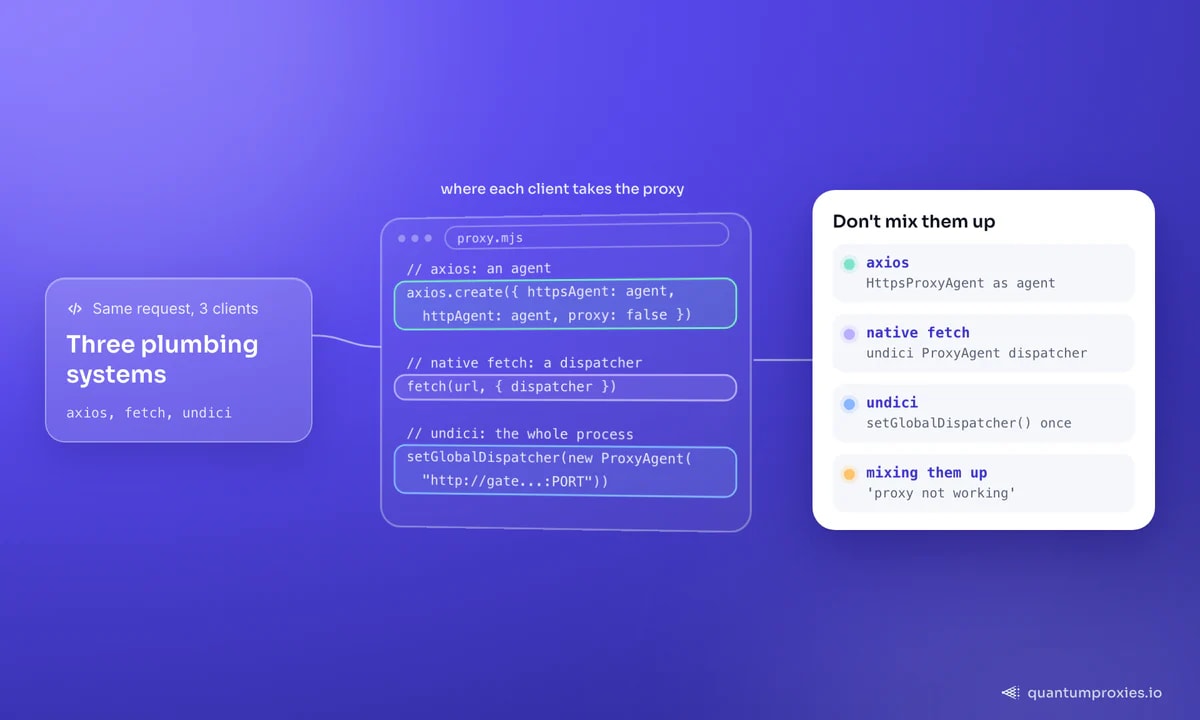
Axios ships with a proxy object — { host, port, auth } — and it works fine for plain HTTP targets. The trap is HTTPS: when the target is https:// and the proxy speaks HTTP, axios fails to open the CONNECT tunnel and your request either hangs or comes back with your real IP. The fix that the community settled on is to bypass the built-in config entirely and hand axios a proxy agent instead, then set proxy: false so the two mechanisms do not fight:
import axios from "axios";
import { HttpsProxyAgent } from "https-proxy-agent";

// Note the destructured import — a default import is the classic gotcha.
const agent = new HttpsProxyAgent("http://USER:PASS@residentialpremium.quantumproxies.io:8080");

const client = axios.create({
  httpAgent: agent,   // for http:// targets
  httpsAgent: agent,  // for https:// targets
  proxy: false,       // disable axios' own broken proxy handling
  timeout: 15000,
});

const r = await client.get("https://httpbin.org/ip");
console.log(r.data); // { origin: "<proxy exit IP>" }
Two details save hours. First, use the destructured { HttpsProxyAgent } import — recent versions export it as a named symbol, and a default import gives you an object that throws when constructed. Second, the proxy URL scheme stays http:// even when the proxy carries HTTPS traffic: the scheme describes how you reach the proxy, and the TLS to the target runs inside the tunnel. The same failure class shows up in Python; if you also work in requests, the patterns rhyme with our ProxyError and SSLError fix guide.
Authentication and environment variables
Authenticated proxies use HTTP Basic credentials. With an agent, embed them in the URL as http://user:pass@host:port; if the password contains @, : or /, URL-encode it with encodeURIComponent() first or the URL splits in the wrong place. A 407 Proxy Authentication Required means the credentials were rejected or your source IP is not whitelisted. Axios also reads HTTP_PROXY, HTTPS_PROXY and NO_PROXY from the environment — handy for proxying a third-party library without touching its code — and you disable that by setting proxy: false. The important warning: native fetch does not read these variables, so a scraper that relies on env-var proxying silently goes direct the moment you switch from axios to fetch.
Proxying native fetch with undici
Node's global fetch is built on undici, and undici is where the proxy lives. You create a ProxyAgent and pass it as the non-standard dispatcher option — this is the modern, dependency-light way to proxy fetch, and it handles HTTPS CONNECT correctly out of the box:
import { ProxyAgent } from "undici";

const dispatcher = new ProxyAgent({
  uri: "http://residentialpremium.quantumproxies.io:8080",
  token: "Basic " + Buffer.from("USER:PASS").toString("base64"),
});

const res = await fetch("https://httpbin.org/ip", { dispatcher });
console.log(await res.json());
If you are on undici directly rather than global fetch, the same ProxyAgent plugs into request() or into setGlobalDispatcher() to proxy every fetch in the process at once. That single-call global switch is the cleanest way to route an entire codebase through a proxy without threading a dispatcher through every function.
SOCKS5 proxies in Node.js
Neither axios nor undici speaks SOCKS natively — pass a socks5:// string to the axios proxy config and you get a protocol mismatch assertion. Install socks-proxy-agent and use it the same way as the HTTPS agent, wired into both httpAgent and httpsAgent. Prefer socks5h:// over socks5://: the trailing h resolves DNS on the proxy side, which stops DNS leaks and resolves geo-fenced hostnames from the exit location. Every SOCKS5 proxy plan exposes the same gateway over HTTP and SOCKS5, so this is a scheme swap, not a new purchase:
import axios from "axios";
import { SocksProxyAgent } from "socks-proxy-agent";

const agent = new SocksProxyAgent("socks5h://USER:PASS@residentialpremium.quantumproxies.io:1080");

const client = axios.create({ httpAgent: agent, httpsAgent: agent });
const r = await client.get("https://httpbin.org/ip");
console.log(r.data);
Rotation without a proxy list
The old recipe — an array of IPs, Math.random() per request, prune the dead ones — is code you no longer maintain. A rotating gateway assigns a fresh exit IP server-side on every request, so one endpoint behaves like a whole pool. Through rotating residential proxies that pool spans 90M+ IPs across 200+ countries, and the loop below prints a different origin each iteration with zero rotation logic:
import axios from "axios";
import { HttpsProxyAgent } from "https-proxy-agent";

const agent = new HttpsProxyAgent("http://USER:PASS@residentialpremium.quantumproxies.io:8080");
const client = axios.create({ httpAgent: agent, httpsAgent: agent, proxy: false });

for (let i = 0; i < 3; i++) {
  const r = await client.get("https://httpbin.org/ip");
  console.log(r.data.origin); // a different exit IP each time
}
When a flow spans several requests — login, add to cart, checkout — per-request rotation breaks the session. A sticky session parameter in the proxy username pins one exit IP for a set window, then rotates; same endpoint, one string change. If you are scaling this into thousands of concurrent requests, move the work off axios loops and read our guide to large-scale scraping architecture for queueing and concurrency budgets.
Streaming responses through a proxy
Downloading files or large JSON payloads works the same as any request once the agent is attached — set responseType: "stream" and pipe the body to disk. The proxy handles the transfer transparently, so a 200MB export never buffers in memory:
import fs from "node:fs";

const r = await client.get("https://example.com/large.json", {
  responseType: "stream",
});
r.data.pipe(fs.createWriteStream("out.json"));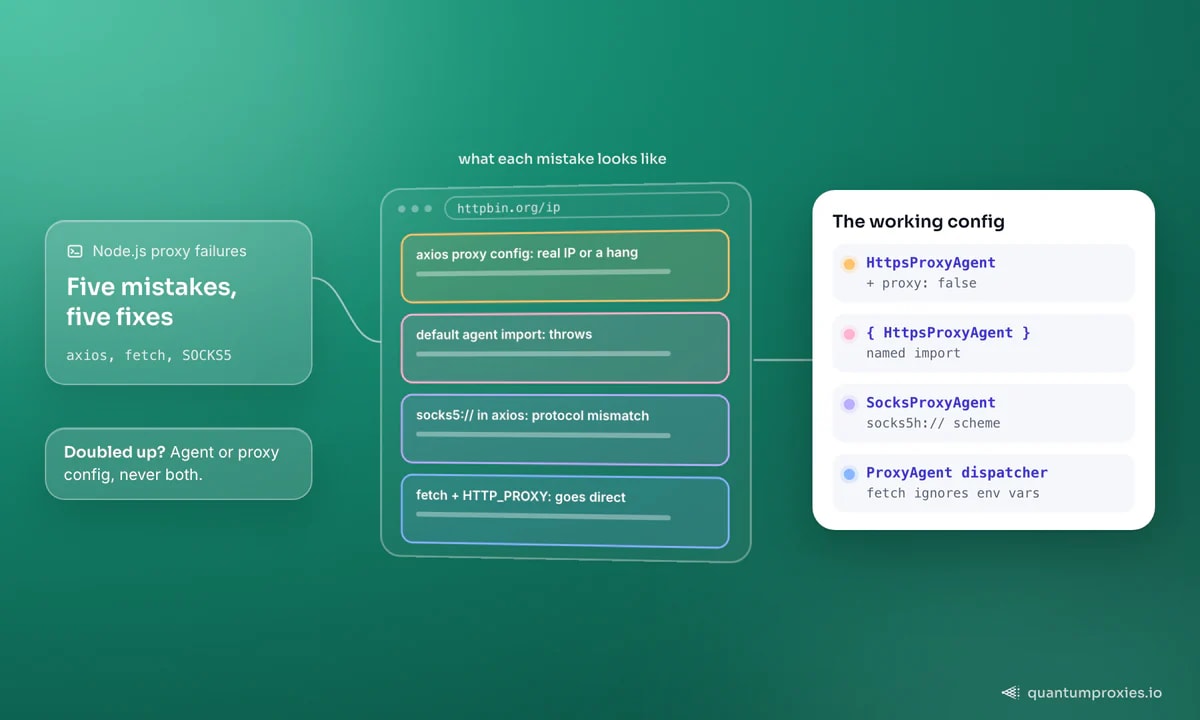
Frequently asked questions
Why is my axios proxy not working?
The most common cause is an HTTPS target behind an HTTP proxy: axios' built-in proxy config fails to open the CONNECT tunnel and returns your real IP or hangs. Switch to a proxy agent — attach HttpsProxyAgent to httpAgent and httpsAgent, and set proxy: false so axios stops trying to handle the proxy itself.
Does axios support SOCKS5 proxies?
Not natively — passing a socks5:// URL to the proxy config throws a protocol-mismatch error. Install socks-proxy-agent, build a SocksProxyAgent, and wire it into both httpAgent and httpsAgent. Use the socks5h:// scheme so DNS resolves on the proxy side rather than leaking from your machine.
How do I use a proxy with native fetch in Node.js?
Native fetch has no proxy option and ignores HTTP_PROXY env vars. Create an undici ProxyAgent and pass it as the dispatcher option on the fetch call, or call setGlobalDispatcher() once to proxy every fetch in the process. Undici handles HTTPS CONNECT correctly with no extra configuration.
How do I set an axios proxy with environment variables?
Export HTTP_PROXY, HTTPS_PROXY and optionally NO_PROXY with full proxy URLs; axios reads them automatically. Set proxy: false on a request or instance to make axios ignore the environment. Remember this only affects axios — undici and native fetch will not pick those variables up.
The whole story fits on a card: axios needs an agent and proxy: false, native fetch needs an undici dispatcher, SOCKS needs its own agent, and rotation belongs on the gateway rather than in your loop. Get the plumbing right and the last variable is IP quality — a clean residential exit passes where a flagged datacenter IP gets a 403 on the same code.