How to Scrape Indeed Job Postings: Structure, Blocks and the SERP Route
Indeed is the biggest job board on the web and a live labor-market signal. It's also behind Cloudflare with class names that rotate weekly. Here's how to extract it durably — and when to skip the site entirely.
Indeed pulls around 542 million visits a month, which makes its listings one of the cleanest live signals for the labor market — hiring demand by role, salary bands, which companies are staffing up. It's also a Cloudflare-protected React site whose visible CSS class names rotate often enough to break a naive scraper within weeks. This guide shows how to scrape Indeed job postings durably, how to page and dedup them, the Cloudflare reality, and the jobs SERP vertical that lets you skip the fight entirely.
Read the search page, anchor on stable attributes
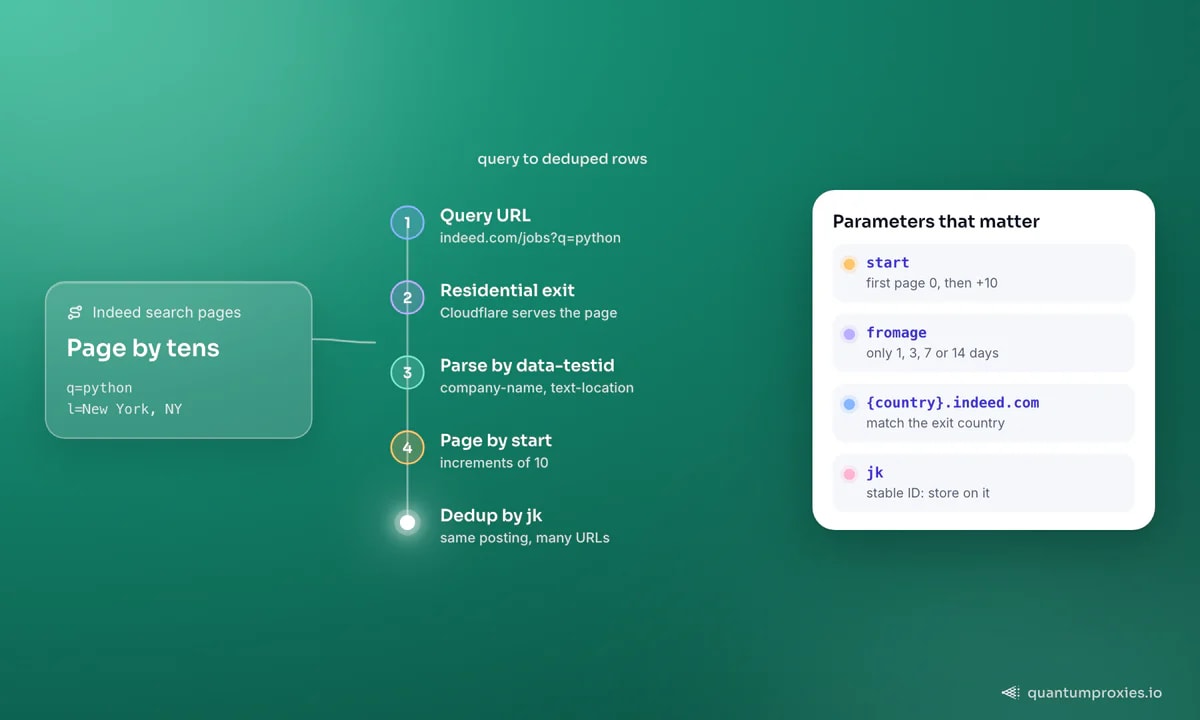
The unit of Indeed data is the search results page: query plus location gives you a page of job cards. The trap is selecting on the hashed class names (things like eu4oa1w0) that Indeed regenerates. Anchor instead on the data-testid attributes, which change far less often:
import requests
from bs4 import BeautifulSoup

headers = {
    "User-Agent": "Mozilla/5.0 (Macintosh; Intel Mac OS X 10_15_7) AppleWebKit/537.36 "
                  "(KHTML, like Gecko) Chrome/146.0.0.0 Safari/537.36",
    "Accept-Language": "en-US,en;q=0.9",
}
proxies = {"http": "http://USER:PASS@residentialpremium.quantumproxies.io:8080",
           "https": "http://USER:PASS@residentialpremium.quantumproxies.io:8080"}

url = "https://www.indeed.com/jobs?q=python&l=New+York%2C+NY"
html = requests.get(url, headers=headers, proxies=proxies, timeout=30).text
soup = BeautifulSoup(html, "html.parser")

jobs = []
for card in soup.select("div.job_seen_beacon"):
    title = card.find("a", class_="jcs-JobTitle")
    company = card.find("span", attrs={"data-testid": "company-name"})
    location = card.find("div", attrs={"data-testid": "text-location"})
    jobs.append({
        "title": title.get_text(strip=True) if title else None,
        "company": company.get_text(strip=True) if company else None,
        "location": location.get_text(strip=True) if location else None,
        "jk": title["href"].split("jk=")[-1][:16] if title else None,
    })
print(len(jobs), "jobs on page 1")
Each card carries a job key (jk) — a stable ID you use to dedup across pages and runs. Store on jk, not URL, because the same posting appears with different tracking parameters.
Pagination and country sites
Indeed pages with a start parameter that increments by 10. And it's not one site — each country is a subdomain: www.indeed.com for the US, uk.indeed.com for the UK, and so on. Match your proxy exit to the country you're querying so the request is geographically coherent:
def crawl(query, location, country="www", pages=5):
    base = f"https://{country}.indeed.com/jobs"
    for start in range(0, pages * 10, 10):
        params = {"q": query, "l": location, "start": start}
        html = requests.get(base, params=params, headers=headers,
                            proxies=proxies, timeout=30).text
        # parse as above, yield rows
        yield html

# freshness filter: fromage accepts only 1, 3, 7 or 14 days
# .../jobs?q=python&l=NYC&fromage=7
One quirk worth knowing: Indeed's "posted within" filter (fromage) only accepts 1, 3, 7 or 14 days — other values are ignored, so build your freshness logic around those buckets.
The Cloudflare reality
Indeed sits behind Cloudflare, so a datacenter IP with a bare request often gets a challenge instead of results. The fixes are the usual anti-bot stack: a coherent browser User-Agent and header set, and — the biggest lever — a residential exit that isn't pre-scored as automation. A residential proxy presents as a real user's connection, which is what keeps Cloudflare serving the page. When a challenge does appear, matching the browser fingerprint matters as much as the IP; our guide on getting past Cloudflare in 2026 covers where the line falls.
The shortcut: the jobs SERP vertical
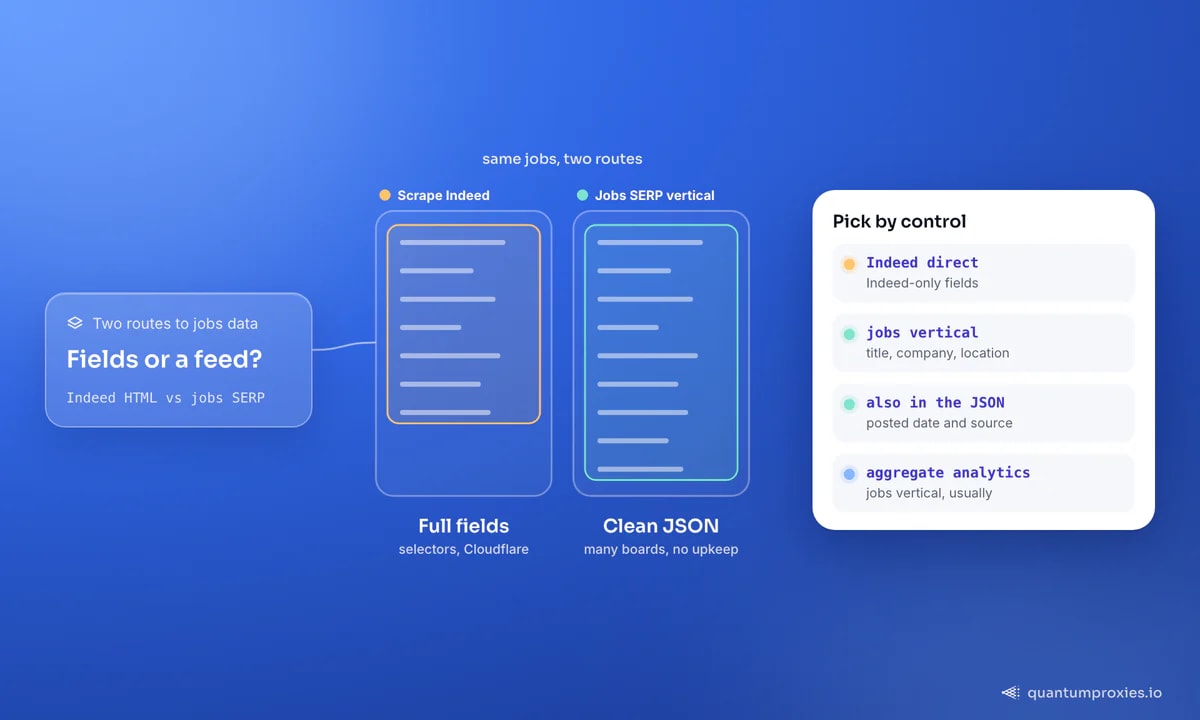
If what you actually want is labor-market data — not Indeed's HTML specifically — there's a cleaner path. Google's jobs vertical aggregates postings from Indeed and many other boards, and a SERP API returns that jobs vertical as parsed JSON: title, company, location, posted date and source, no CSS selectors to maintain and no Cloudflare to fight. You trade some field-level control for a stable structured feed across many boards at once, which for aggregate hiring analytics is usually the better deal. It's the same reasoning behind building a job-board aggregator on a SERP feed rather than one scraper per site.
Pull the jobs vertical as clean JSON
What the data is good for
Beyond a job search, this data drives real analysis: salary benchmarking by role and city, demand tracking for specific skills over time, competitor hiring signals (a rival staffing a new team is a strategy tell), and enrichment — pairing a company's open roles with firmographics for outbound. Pair it with Glassdoor salary data and you get a fuller comp picture than either source alone.
Frequently asked questions
Can you legally scrape Indeed job postings?
Job postings are public data, and collecting publicly visible listings is broadly defensible, but Indeed's terms restrict automated access and you should avoid personal data and respect rate limits. Many teams sidestep the terms question by using the aggregated jobs SERP vertical instead of scraping Indeed directly. This is general information, not legal advice — review the current terms before a large project.
Why does my Indeed scraper keep breaking?
Two reasons. First, Indeed rotates its hashed CSS class names, so selectors pinned to them fail within weeks — anchor on data-testid attributes and the job key instead. Second, Cloudflare starts challenging your IP once it's flagged; a residential exit and a coherent browser fingerprint keep the real page loading. Fix both and the scraper stabilises.
How do I scrape jobs from multiple countries?
Indeed serves each country from its own subdomain (www.indeed.com, uk.indeed.com, de.indeed.com, and so on). Query the right subdomain and route through a proxy exit in that country so the request is geographically consistent — otherwise you may get mismatched or redirected results. The jobs SERP vertical also accepts a country parameter if you'd rather not manage subdomains.
Is the Google jobs SERP better than scraping Indeed?
For aggregate labor-market analytics, usually yes. The jobs vertical returns postings from Indeed and many other boards as structured JSON, with no rotating selectors and no Cloudflare challenge to handle. You lose some Indeed-specific fields, but you gain a stable multi-source feed and far less maintenance. Scrape Indeed directly only when you need fields that live on Indeed's own pages.
Indeed rewards the durable approach: anchor on stable attributes, dedup by job key, page by tens, and knock with a residential IP so Cloudflare serves you. And when you only need the labor-market signal rather than Indeed's exact HTML, the jobs SERP vertical hands it to you as JSON. Pick the path that matches how much field control you actually need.