How to Scrape Glassdoor Salaries and Reviews for Comp Benchmarking
Glassdoor hides its data behind a login overlay - but the content is already in the page's JSON, sitting under the modal. Here's how to find an employer ID, read that JSON, and benchmark comp without tripping the block.
Glassdoor is the reference dataset for compensation and employer-reputation research - salaries, ratings and reviews across millions of companies. It also throws a login overlay in your face and rate-limits aggressively. The trick most people miss: that overlay is cosmetic. The company data is already loaded into the page's JSON, sitting underneath the modal. This guide shows how to scrape Glassdoor salaries and reviews for comp benchmarking - resolve an employer ID, read the JSON, and pace requests so you don't hit the 403 wall.
Step 1: resolve the company to an employer ID
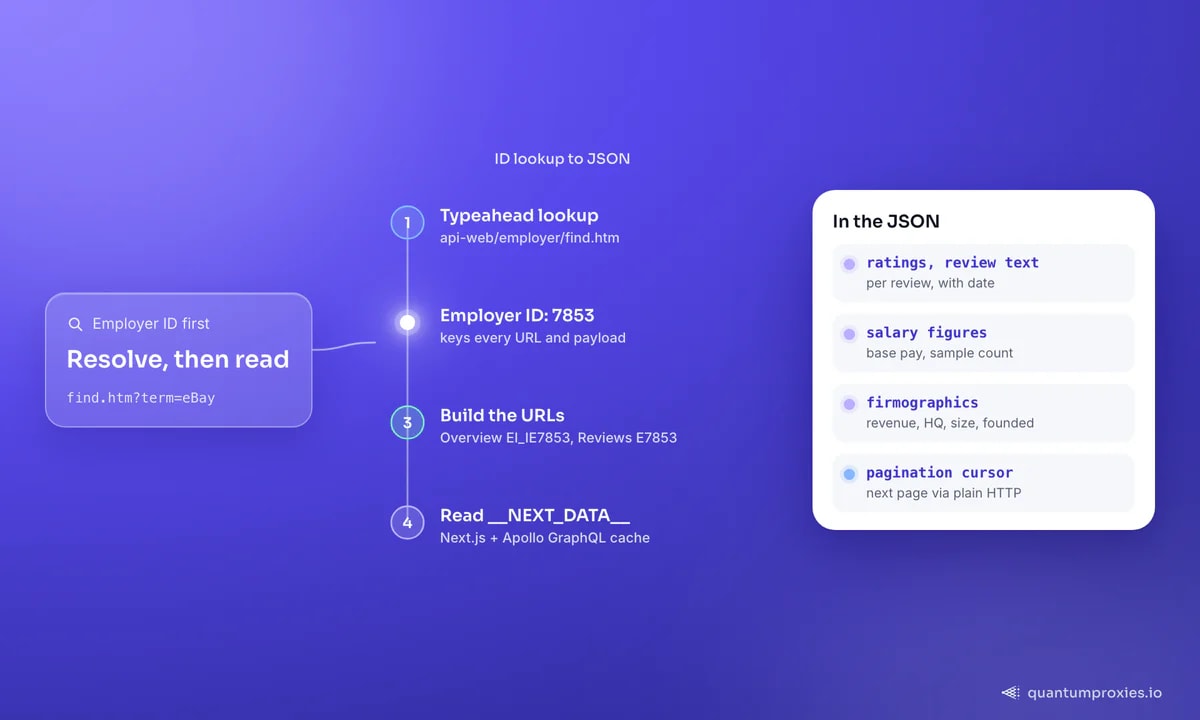
Every Glassdoor page keys off a numeric employer ID, not a name. There's an internal typeahead endpoint that maps a company name to its ID - the same one that powers the search box. Hit it and you get the canonical name plus the ID you need to build every other URL:
import requests

proxy = "http://USER:PASS@residentialpremium.quantumproxies.io:8080"
proxies = {"http": proxy, "https": proxy}

def find_employer_id(name):
    url = "https://www.glassdoor.com/api-web/employer/find.htm"
    params = {"autocomplete": "true", "maxEmployersForAutocomplete": 10, "term": name}
    r = requests.get(url, params=params, proxies=proxies, timeout=15,
                     headers={"User-Agent": "Mozilla/5.0"})
    return r.json()  # -> [{"id": 7853, "shortName": "eBay", ...}, ...]

print(find_employer_id("eBay"))
With the ID you can build the overview URL (/Overview/Working-at-NAME-EI_IE{id}.htm) and the reviews URL (/Reviews/NAME-Reviews-E{id}.htm). No browser needed yet.
Step 2: read the JSON, not the HTML
Glassdoor is a Next.js app, so each page ships its data as a JSON blob - in the __NEXT_DATA__ script tag and an Apollo GraphQL cache. Parse that instead of scraping the rendered DOM: it carries ratings, salary figures, review text, plus firmographics like revenue, HQ, company size, year founded and industry. It's far more stable than CSS selectors, which Glassdoor rotates behind data-test attributes.
import json, re

def scrape_overview(name, employer_id):
    url = f"https://www.glassdoor.com/Overview/Working-at-{name}-EI_IE{employer_id}.htm"
    r = requests.get(url, proxies=proxies, timeout=20,
                     headers={"User-Agent": "Mozilla/5.0"})
    m = re.search(r'<script id="__NEXT_DATA__"[^>]*>(.*?)</script>', r.text, re.S)
    data = json.loads(m.group(1))
    # firmographics + ratings live inside the Apollo cache under props
    return data["props"]["pageProps"]

data = scrape_overview("eBay", 7853)
The login modal you see in a browser is a fixed overlay (its container id is HardsellOverlay) drawn on top of the page. Because the underlying content is already in the DOM and the JSON, an HTTP request that reads the raw markup never sees the modal at all. If you do render with a browser, you can drop the overlay with a one-line CSS injection (display:none) rather than trying to log in.
Paging reviews and reading salary distributions
Reviews and salaries are paginated, and the pagination cursor lives in the same JSON you already parsed - not in a fragile "next" button you have to click. Read the current page's data, find the cursor or page number in the payload, and request the next page's URL directly. This is why parsing the JSON beats driving a browser: you walk pages with plain HTTP requests, one per page, at whatever pace you choose. Pull the review body, star rating, job title, location and date for each entry, and you have a structured review corpus you can run sentiment analysis over - the same raw material covered in our review-scraping guide.
Salaries are the higher-value target, and the honest advice is to treat them as distributions, not point values. A single scraped figure is noisy; the useful signal is the range and median across many submissions for a role in a given location. The JSON exposes the numbers you need - base pay, the sample count behind each estimate, currency and location - so aggregate them yourself rather than trusting any one number. Weight by sample size, drop roles with too few data points to be meaningful, and always pair a salary with its location and the date it was collected - ideally via a residential exit in that market - because comp benchmarks go stale and vary wildly by market. That discipline is what turns scraped rows into a benchmark a hiring or finance team can actually defend. It also protects you from the classic trap of quoting a single eye-catching figure that turns out to rest on two submissions from three years ago.
Step 3: set the region so the data matches your market
Glassdoor localises salaries and content by region through a tldp cookie: 1 is the US, 2 the UK, 3 Canada, 4 India, 5 Australia, 6 France, 7 Germany. Set it to benchmark comp in the market you actually care about - a US salary figure is meaningless for a UK role. Pair the cookie with a proxy exit in the matching country so the request is coherent end to end. Our guide to B2B data collection covers keeping geo signals consistent across a pipeline.
Get geo-targeted residential proxies
Handling the 403 rate limit
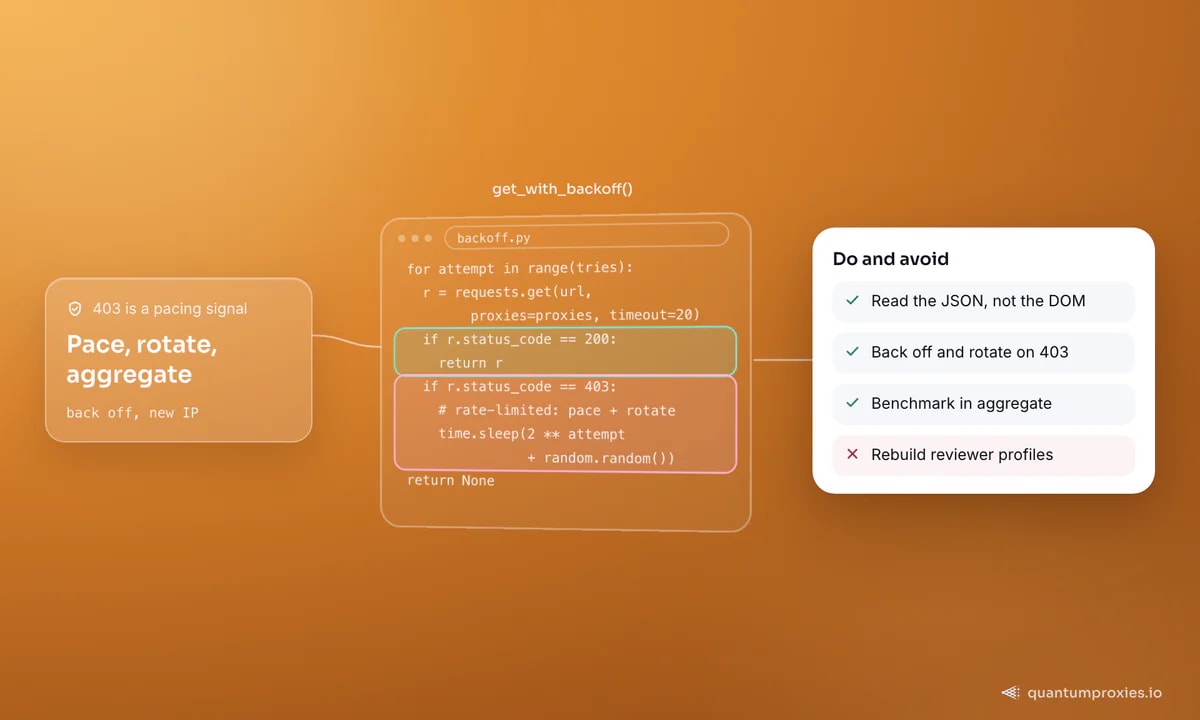
Glassdoor answers aggressive scraping with HTTP 403, not a CAPTCHA. Treat a 403 as a pacing signal, not a dead end: back off exponentially, rotate to a fresh IP, and slow your overall rate. A single datacenter IP walking through review pagination gets throttled within a page or two; spreading requests across a residential pool and pausing between them keeps you under the radar.
import time, random

def get_with_backoff(url, tries=4):
    for attempt in range(tries):
        r = requests.get(url, proxies=proxies, timeout=20,
                         headers={"User-Agent": "Mozilla/5.0"})
        if r.status_code == 200:
            return r
        if r.status_code == 403:              # rate-limited: pace + rotate
            wait = (2 ** attempt) + random.random()
            time.sleep(wait)                   # rotating gateway gives a new IP
    return None
A quick word on ethics and law: benchmark in aggregate. Salaries and ratings are useful as distributions; individual reviews attached to identifiable people are personal data, so don't rebuild profiles of reviewers, and respect Glassdoor's Terms and robots directives. This is guidance, not legal advice - check your jurisdiction. Our overview of web scraping legality in 2026 goes deeper.
Frequently asked questions
How do I scrape Glassdoor reviews with Python?
Resolve the company to its employer ID via the internal typeahead endpoint, build the reviews URL with that ID, then parse the __NEXT_DATA__ JSON in the page rather than the HTML. Route requests through residential proxies and back off on any 403. The review text, ratings and pagination cursors all live in that JSON payload.
Can I get past the Glassdoor login wall?
Usually you don't need to. The login prompt is a cosmetic overlay drawn on top of content that's already loaded in the page and its JSON. A plain HTTP request that reads the raw markup never renders the modal. If you use a real browser, hide the overlay with a CSS display:none injection instead of logging in.
Why does Glassdoor return 403 errors?
A 403 is Glassdoor rate-limiting you, typically because too many requests came from one IP too fast. Slow down, add exponential backoff, and rotate through a residential proxy pool so requests spread across many IPs. It's a pacing problem, not a permanent block - steady, human-like timing clears it.
Is scraping Glassdoor legal?
Collecting public, aggregate company data for benchmarking is generally lower-risk, but Glassdoor's Terms restrict automated access and individual reviews can be personal data. Keep it aggregate, don't reconstruct identifiable people, and respect robots and Terms. This is general guidance, not legal advice - assess your own use case.
The whole job is three moves: resolve the employer ID, read the JSON the page already contains, and pace requests across clean IPs so 403s stay rare. Do that and Glassdoor becomes a live comp-benchmarking feed instead of a login wall you keep bouncing off.