How to Scrape Pinterest Trends Data for Ecommerce Research
Pinterest is a demand-signal goldmine — and one of the harder targets, because it leaves no JSON on the page. Here is how to render, select pins, follow trends, and keep headless mode from getting you blocked.
Pinterest is a demand-signal engine: what people save now predicts what they buy next season, which makes its pins, boards and search suggestions genuinely useful for ecommerce and content research. It is also one of the more awkward targets, because unlike most marketplaces it ships no structured data in the page. Everything is rendered dynamically, and there is no tidy JSON blob to regex out. That means you render first, then read the DOM. This guide covers the render-and-select method, how to mine trend and keyword signals, and the proxy and header choices that keep headless mode from getting you blocked. Work within Pinterest's terms and stick to public data.
Why the hidden-JSON trick does not work here
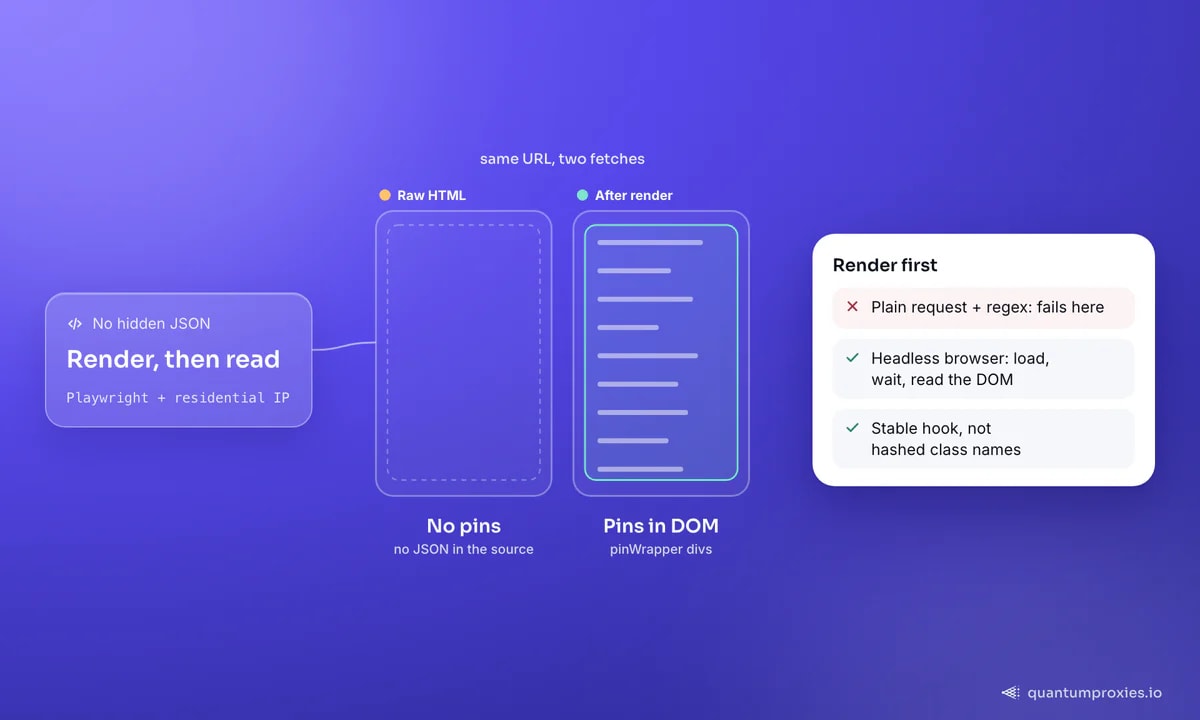
On many sites the data is sitting in a JavaScript variable in the source, so a single plain request plus a regex is enough. Pinterest generates all its content client-side and does not leave those structures on the page. If you download the raw HTML, the pins are not in it — they get injected after JavaScript runs. So the reliable approach is a headless browser (Playwright works well) that loads the page, waits for content, and then extracts from the live DOM. The pins are deeply nested but consistently marked: each one lives inside a div with data-test-id="pinWrapper", which is a far more stable hook than a hashed class name.
Rendering and selecting pins
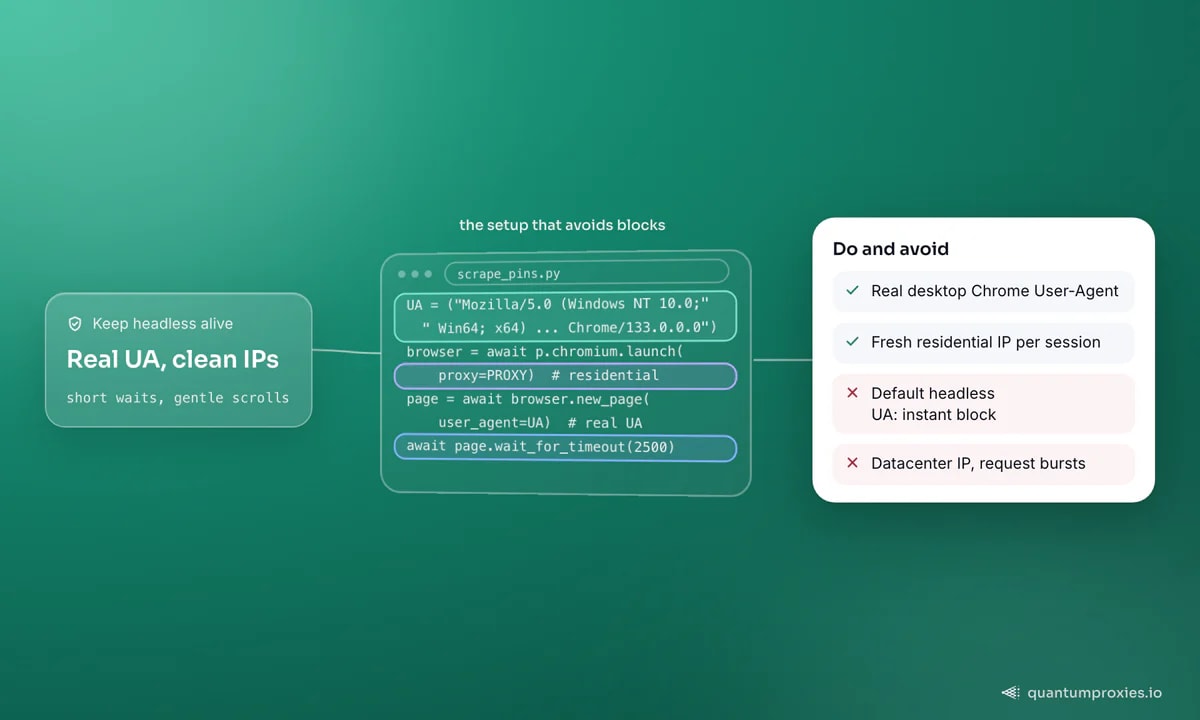
The single most important detail: set a real desktop User-Agent. In headless mode Pinterest blocks the default automation UA outright, and swapping in a normal Chrome string is often the difference between an empty list and a full page of pins. Load the search URL, give the content a moment to render, then query all the pin wrappers and pull the title, URL and thumbnail from each:
import asyncio, json
from playwright.async_api import async_playwright

UA = ("Mozilla/5.0 (Windows NT 10.0; Win64; x64) AppleWebKit/537.36 "
      "(KHTML, like Gecko) Chrome/133.0.0.0 Safari/537.36")

PROXY = {"server": "http://residentialpremium.quantumproxies.io:8080",
         "username": "USER", "password": "PASS"}

async def scrape_pins(query):
    url = f"https://www.pinterest.com/search/pins/?q={query}&rs=typed"
    results = []
    async with async_playwright() as p:
        browser = await p.chromium.launch(proxy=PROXY)
        page = await browser.new_page(user_agent=UA)   # real UA is mandatory
        await page.goto(url, timeout=30000)
        await page.wait_for_timeout(2500)              # let pins render
        pins = await page.query_selector_all("div[data-test-id='pinWrapper']")
        for pin in pins:
            link = await pin.query_selector("a")
            if not link:
                continue
            img = await link.query_selector("img")
            results.append({
                "title": await link.get_attribute("aria-label"),
                "url": await link.get_attribute("href"),
                "img": await img.get_attribute("src") if img else None,
            })
        await browser.close()
    return results

pins = asyncio.run(scrape_pins("minimalist home office"))
print(len(pins), "pins")
That yields the essentials for trend work: the pin title (which is rich, descriptive text pinners write themselves), the destination URL, and the thumbnail. Scroll the page in a loop before selecting if you want more than the first viewport — Pinterest lazy-loads as you go.
From pins to trend signals
Raw pins are only step one. The research value comes from aggregating them into signals your merchandising or content team can act on:
- Keyword expansion — Pinterest's search autocomplete surfaces the phrasing shoppers actually use; capture the suggestions for a seed term to build a content and product-tag vocabulary.
- Board mining — a board is a hand-curated collection around a theme; scraping the pins on high-follower boards shows what is being saved together right now.
- Descriptive-text frequency — the
aria-labeltitles are keyword-dense; counting recurring terms across a search reveals the language and aesthetic driving a niche. - Seasonality — repeat the same searches weekly and diff the results to catch rising themes before they peak, which is the whole point of using Pinterest as a leading indicator.
Because these signals are strongest when you compare markets, geo-target the exit IP: what surfaces for a US shopper differs from a UK or German one, and that gap is often the opportunity. Route each run through a country-specific residential proxy and store the market alongside the data.
One practical tip for trend work: capture the same searches on a fixed weekly cadence and store every snapshot rather than overwriting. A pin count for "cottagecore kitchen" means nothing in isolation, but a rising line across eight weeks is a genuine leading indicator — Pinterest saves precede purchases, so a theme gaining momentum on the platform now is a merchandising signal for next quarter. The diffing is trivial once you have consistent snapshots; the discipline is collecting them reliably, which is exactly where clean IPs and a stable selector pay off.
Keeping headless mode alive
Pinterest watches for automation, so a browser on a datacenter IP with a robotic fingerprint gets flagged fast. Three habits keep sessions healthy: a coherent real User-Agent (already covered), a fresh rotating residential IP per session so one address is not tied to dozens of searches, and human-ish pacing — a short wait after load, gentle scrolling, no thousand-request bursts. Our guide on scraping JavaScript-heavy sites covers the rendering-plus-proxy combination in depth, and the same anti-block hygiene applies to other social platforms — see scraping public Instagram data for the parallel.
Get residential IPs built for social scraping
When a browser fleet stops being worth it
Rendering every page is slow and expensive — a headless browser costs an order of magnitude more per page than a plain request in both time and bandwidth. At research scale, that adds up. A Scraper API that renders on demand and returns structured data lets you skip the browser fleet, the proxy rotation and the block-handling, so you spend your time on analysis instead of maintenance. It also pulls richer fields — follower counts, save and comment counts, categories and hashtags — that a quick DOM scrape leaves on the table.
Frequently asked questions
How do I scrape Pinterest with Python?
Use a headless browser like Playwright rather than plain requests, because Pinterest renders content with JavaScript and leaves no data in the raw HTML. Set a real desktop User-Agent, load the search or board URL, wait for pins to render, then select every div[data-test-id="pinWrapper"] and read the title, URL and image from each.
Does Pinterest have a public API?
Pinterest offers an official API for business and developer accounts, but it is scoped, rate-limited and centred on managing your own content and ads rather than broad trend research across the network. For public pin, board and search-trend data across niches and markets, most researchers render the public pages instead.
Why does Pinterest block my scraper?
The two most common causes are the default headless User-Agent, which Pinterest blocks on sight, and a datacenter IP tied to many rapid requests. Fix both: send a normal Chrome UA, rotate a residential IP per session, and pace requests with waits and scrolling rather than firing bursts.
Is scraping Pinterest legal?
Collecting publicly visible data sits in a legal grey area and depends on jurisdiction, purpose and Pinterest's terms of service. Stick to public pins and boards, avoid personal data and anything behind a login, and consult legal counsel for commercial use. This is general information, not legal advice.
Pinterest rewards patience: render the page, target the stable pin wrapper, aggregate the descriptive titles and search suggestions into trend signals, and keep your fingerprint and IPs clean. Do that per market and you get a leading indicator of demand that most competitors are not watching.