Running Multiple Accounts Without Bans: The Proxy Playbook
One flagged account taking down all the others is not bad luck — it is chain-banning, and it is predictable. Here is how platforms link your accounts in 2026, and the proxy setup that keeps each one genuinely separate.
If you have ever lost a batch of accounts overnight — one gets flagged, and hours later the rest are gone too — you did not hit a run of bad luck. You hit chain-banning, and it is entirely predictable. Whether you are an agency running client profiles, an e-commerce seller with multiple storefronts, an affiliate testing offers, or a social team managing brand and creator accounts, platforms in 2026 are very good at deciding that a group of accounts is really one operator, and punishing them as a set.
Running multiple accounts is legitimate for a huge range of real businesses. The problem is never the accounts — it is the digital breadcrumb trail that links them. Understanding what platforms actually look at, and cutting those links cleanly, is the difference between a stable operation and a monthly massacre. Proxies are one half of that; here is where they fit and where they don't.
How platforms link your accounts
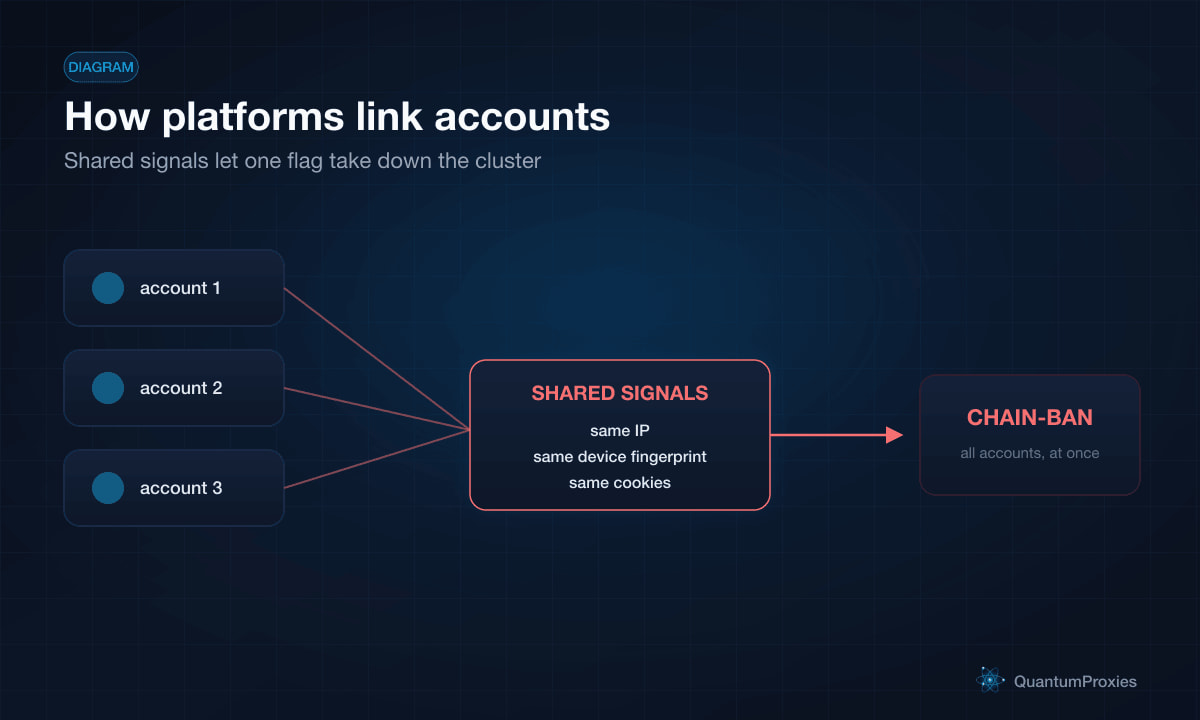
Modern platforms do not rely on your login alone. They fingerprint the environment behind it and cluster accounts that share too much. The signals fall into three buckets:
- Network — your IP address and its history. Five accounts logging in from one IP is the single loudest signal that they belong to one person.
- Device fingerprint — hardware entropy the browser leaks: screen resolution, GPU and WebGL signatures, canvas rendering, audio stack, installed fonts. This identifies your machine even after you clear cookies or change IP.
- Session artifacts — cookies, local storage, and cache that carry across sessions and quietly tie one profile to the next.
This is why the naive fix fails. Some operators try to use Chrome's built-in profiles to separate accounts — it does not work in 2026. Chrome profiles share the same hardware ID and WebGL fingerprint, so if one account gets flagged for aggressive behavior, the platform chain-bans every other account tied to that same hardware signature. Separate logins, one identity underneath: the platform sees straight through it.
The two layers you actually need
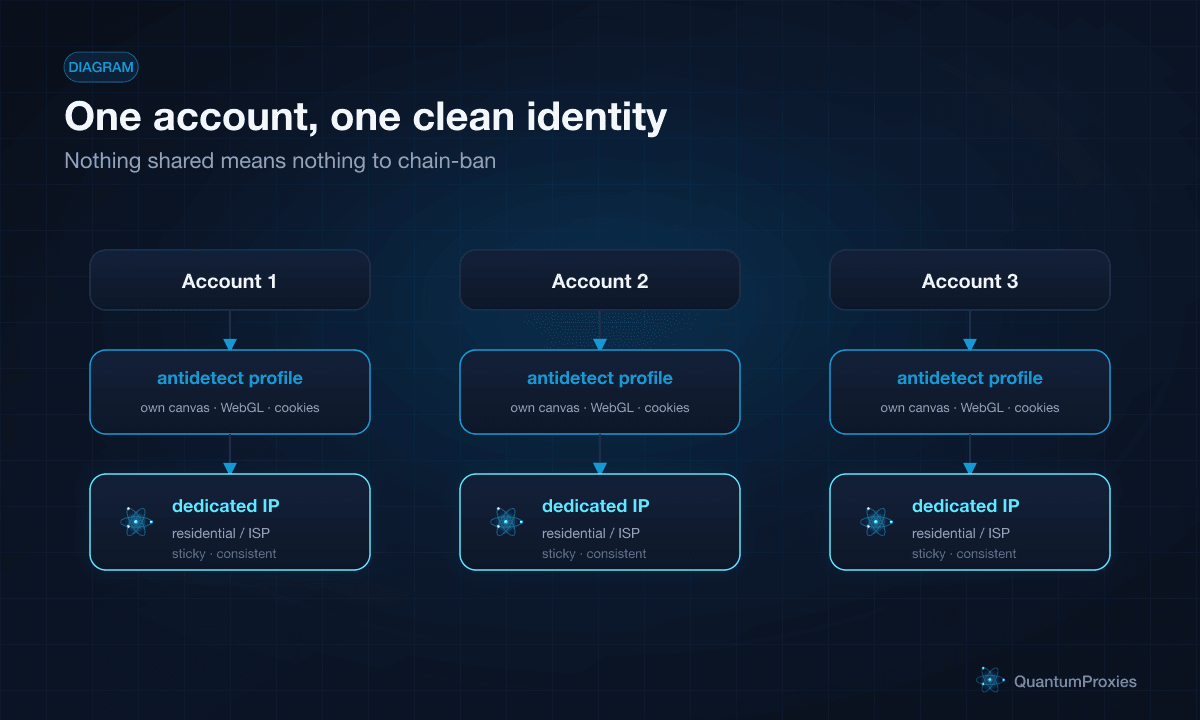
Real account separation takes two independent layers, and neither works alone.
Layer 1: A unique device fingerprint per account
An antidetect browser creates isolated profiles, each with its own canvas, WebGL, and audio signatures, its own cookie jar, and its own storage. To the platform, each profile looks like a different physical laptop. Tools like this are what make the device layer separable at all — without them, every profile on your machine shares one hardware identity.
Layer 2: A clean, consistent IP per account
A perfect fingerprint still gives you away if all your profiles exit through the same IP. Each account needs its own IP that looks residential and, ideally, stays consistent for that account — real users do not teleport across the world between logins. This is the proxy layer, and it is the one people cut corners on: a great antidetect setup routed through one datacenter IP is still one obvious cluster.
There is a nice detail in how the two layers reinforce each other. A properly configured antidetect profile sets WebRTC to reveal the proxy's IP rather than hiding it — because a disabled WebRTC is itself a bot signal, while a residential proxy IP showing through is exactly what a real user looks like. The proxy is not just hiding you; it is completing the disguise.
Which proxy for which account
Not every account needs the same kind of IP. Match the proxy to the platform's sensitivity:
- Residential proxies — real ISP-assigned home IPs, the default for social platforms and marketplaces that fight multi-accounting hard. Low block rate, looks like a genuine household.
- Mobile proxies — real carrier IPs, the most trusted of all because thousands of real users share them. Best for the most aggressive platforms and mobile-first apps.
- ISP proxies — hosted on datacenter infrastructure but registered to an ISP, giving you residential-grade trust with static, always-on stability. Ideal when an account needs the same IP every day.
- Sticky sessions — keep one account on one IP for hours or days, so its location stays consistent instead of hopping around and looking suspicious.
The rule of thumb: one account, one stable identity — a dedicated fingerprint and a dedicated IP that behaves like a real person's connection. The moment two accounts share either layer, you have handed the platform a reason to link them.
How QuantumProxies fits
The proxy layer is the half of account separation that most setups get wrong, and it is the half QuantumProxies is built for. You get residential and mobile IPs that read as genuine users, ISP proxies when an account needs a stable static address, and sticky sessions so each profile keeps a consistent location. Pair one dedicated IP with each antidetect profile and the shared-network signal — the loudest link of all — simply disappears.
Because the IPs work with any antidetect browser and any automation stack, you are not locked into a workflow: assign a clean proxy per profile in the tool you already use and scale from a handful of accounts to hundreds without every login pointing back to the same place.
Get clean IPs for multi-account management
Start with a free trial, put one dedicated IP behind each account, and give your profiles the one thing chain-banning depends on you skipping: genuine separation. Multiple accounts are not the risk — sharing an identity between them is.